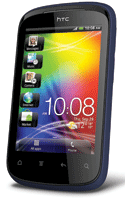
The HTC Explorer runs on Android 2.3.5 Gingerbread OS skinned with the famous HTC Sense 3.5 UI. Power up the device and you are greeted with the 3.2-inch screen that boasts of a resolution of 320x480 pixels. The new Sense UI has the option to quickly access any four functions you desire from the lock screen. It comes pretty handy if you want to quickly access your contacts, messages or even the camera.
The interface is simple - drag the shortcut icon from the lock screen into the circle at the bottom of the display and you are immediately redirected to the particular app. If you wish to unlock the device in the traditional way, just drag the circle up and you will be greeted to the home screen. True to the Sense UI tradition, you have the option of 7 customizable homescreens that you can load with shortcuts and widgets. The drop down notifications bar gives you quick access to recently used apps and a quick select option for network, Bluetooth, memory and more.
With HTC Explorer we have put what is most important to you right at your fingertips. The lockscreen lets you access your contacts, mail, camera, and messages in one swipe even when your phone is locked. And to make things convenient for you, HTC Explorer offers an intuitive, clean homescreen design that focusses on the most frequently used features and notifies you when you have received an email or text message or have a calendar event.
With HTC Explorer, you'll enjoy web browsing that is similar to your desktop computer. Websites are easy to find and easy to read. To make your viewing even easier, the HTC Explorer automatically adjusts the text on your screen so you won't have to pan left and right to get all the news. Zoom in and dial a phone number on the web page in one easy step. And when you click on an address, a map opens up instantly for you to check out its location.